Where can students find Build My Exam?
Students can access Build My Exam from two locations within their subject pages:
- Questionbank
- Practice Exams
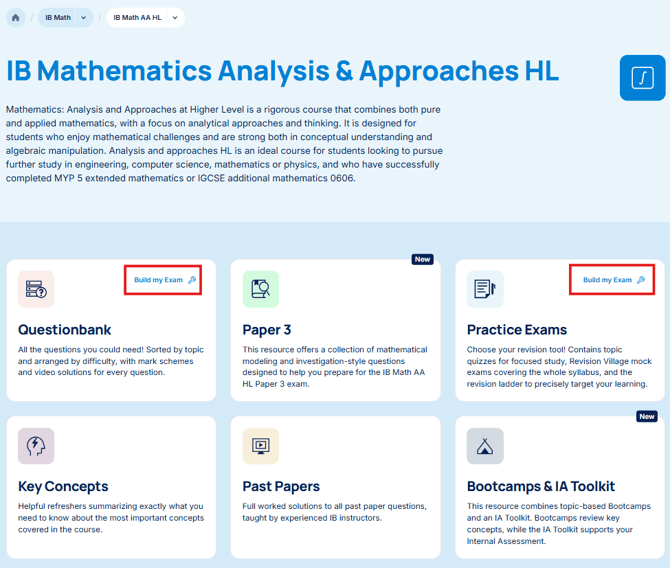
Selecting either option opens the new Build My Exam setup page, where you can customize exactly how you want your assessment to look.
Configure Your Exam
Before generating an exam, you can choose from several customization options to create an assessment that matches their revision goals.
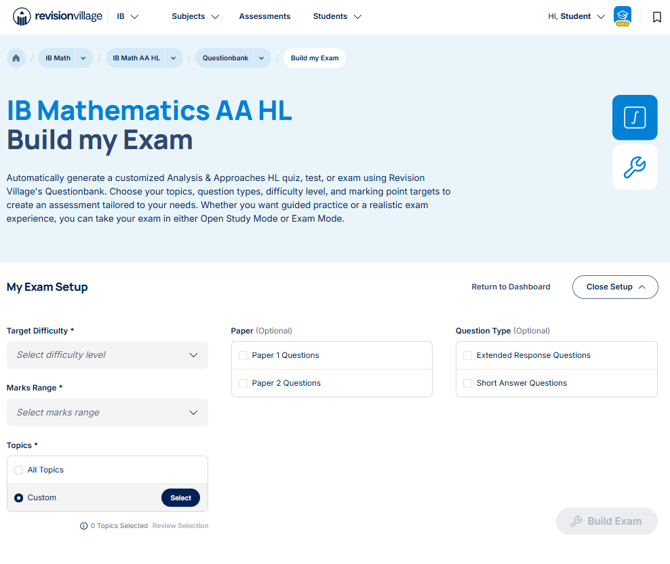
Target Difficulty
Choose your desired overall difficulty level:
- Easy
- Medium
- Hard
The selected difficulty determines the overall distribution of question difficulty, rather than making every question the same level.
For example:
- Selecting Medium will create a practice paper primarily consisting of medium-difficulty questions, while still including some easier and more challenging questions for balance.
- Selecting Hard will increase the proportion of difficult questions while still including some medium and easier questions.
Marks Range
You can also select your desired mark total for the assessment.
This allows you to generate anything from a short revision quiz to a full exam-length paper depending on the amount of practice you want to complete.
Topics
You can then choose whether questions should be selected from:
- All Topics — generates an exam covering the entire syllabus.
- Custom Topics — allows you to select specific topics and subtopics for targeted revision.
This makes it easy to focus on particular topics while still having the option to simulate a complete practice examination.
Paper Selection (Optional)
You can optionally choose which paper types to include:
- Paper 1 Questions
- Paper 2 Questions
- Paper 3 Questions (where applicable)
Leaving this blank allows Revision Village to select questions across all available paper styles.
*Note that choosing Paper 2 Questions will simply select from available Paper 2 Questions, rather than balancing a complete Paper 2. For pre-assembled, well-balanced Papers, please see the Mock Exams within the Practice Exams section.
Question Type (Optional)
You can further refine your assessment by selecting question styles:
- Extended Response Questions
- Short Answer Questions
- Data-based Questions
- Multiple Choice Questions
- Practical-based Questions
- Comprehension Questions
- Source Based Questions
- Listening Comprehension Questions
- Reading Comprehension Questions
Alternatively, you can leave this unselected to generate a mix of question types.
Build Your Practice Exam
Once the settings have been configured, students simply click Build Exam.
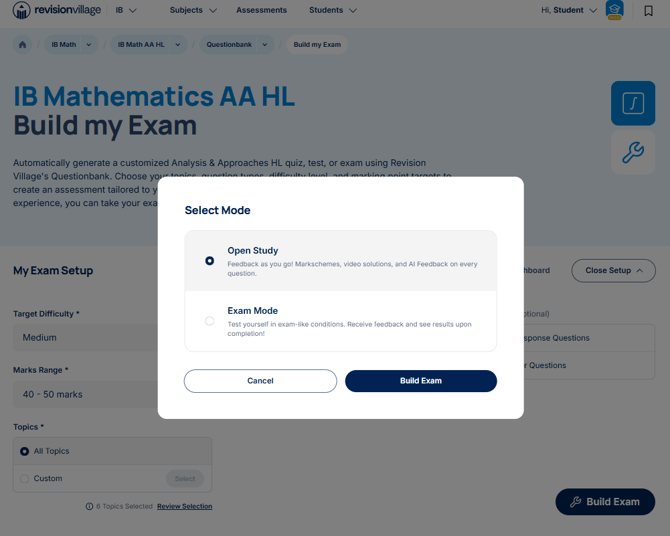
A pop-up window then allows students to choose between two different learning experiences:
- Open Study Mode
- Exam Mode
Open Study Mode
Open Study Mode is designed for guided learning and active revision.
You will receive:
- Immediate feedback as they work through questions.
- Access to detailed markschemes and video solutions
- Access to Newton AI for question and markscheme assistance.
This mode closely resembles the familiar Questionbank experience and is ideal for learning new content or improving understanding topic by topic.
Exam Mode
Exam Mode recreates a more authentic assessment experience.
You will:
- Work through questions one at a time.
- Complete the assessment under exam-style conditions.
- Receive their feedback and results once the exam has been completed.
You can also choose whether or not to use the Newton AI Chatbot during your practice exam session.
This makes Exam Mode an excellent option for mock exams, timed practice, and measuring exam readiness. Completed exams made using Build my Exam in Exam Mode can be found in the your Assessment page.